Writing ·
To test a couples app, you need a couple. How I built a robot couple for Loverzz.
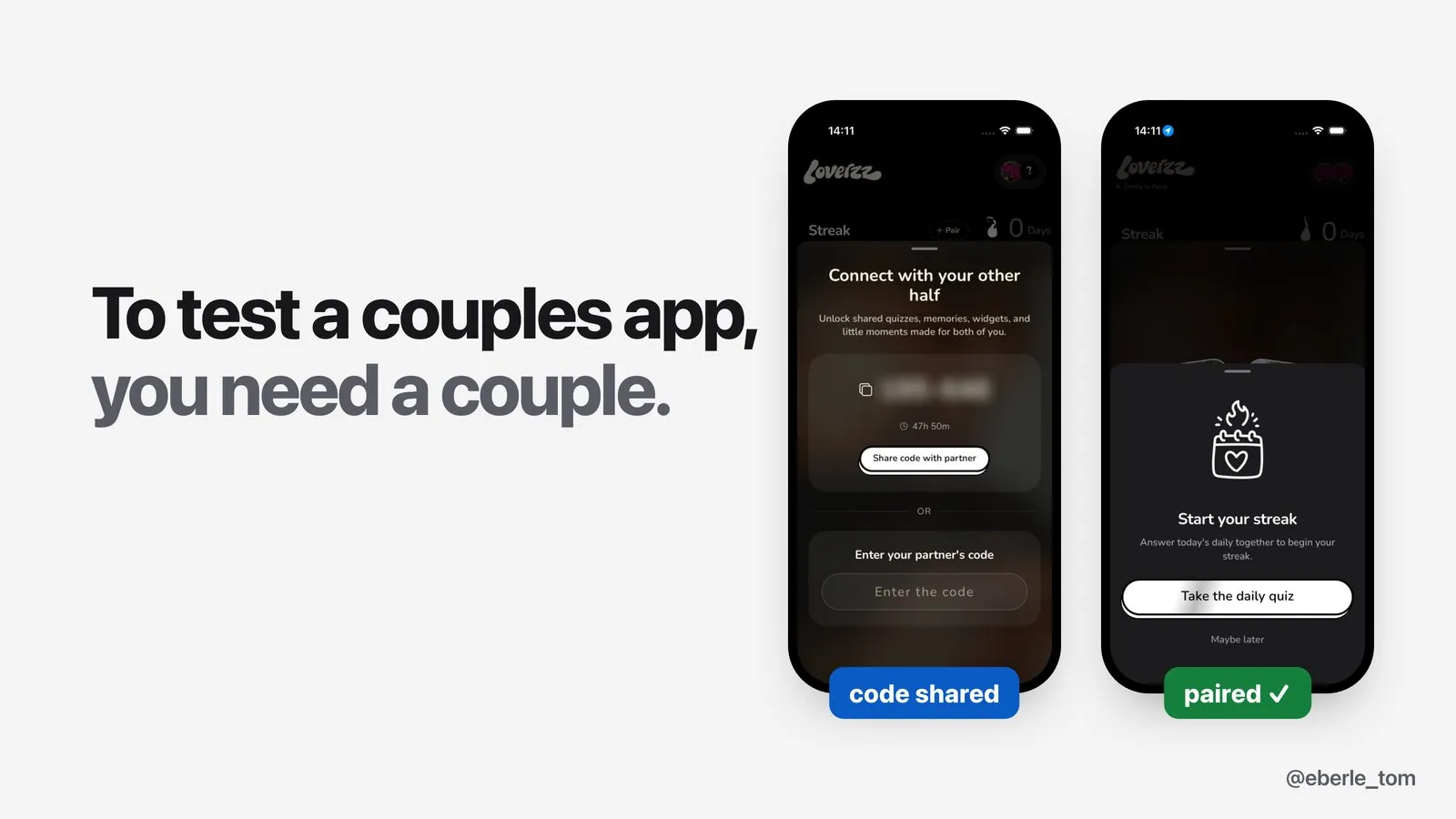
Loverzz is a couples app. Almost every feature needs two people: you pair with your partner, you both answer a quiz, you draw on a shared canvas, you send each other notes.
So testing it by hand means two phones in my hands, going through every screen, on every release. In English, and again in French.
In June I built a robot that does it for me: two iPhones that behave like a couple. I built it with Claude Code as my pair programmer. This post explains how it works, what we chose, and what failed.
In short:
- Two iPhone simulators onboard, pair and test the couple features of Loverzz, in English and French.
- One Node coordinator drives both phones with
idbandsimctl, reads hidden paywalls with OCR, and publishes a screenshot report. - No AI model at run time. The agent explored the app once, then everything became plain scripts.
The constraints
As we built it, these became the main constraints:
- Two devices that talk to each other. Phone A creates a code, phone B joins. A answers a quiz, B must see it waiting. A draws, B must see the drawing.
- Something close to production. The real code, the real backend, not a demo build.
- Paywalls everywhere. Many features are premium. I want to see the paywall as a free user, and the feature working as a premium user.
- Two languages. Every flow in English and in French.
- A brand new couple every run. No leftovers from the last run.
- One old Mac. An Intel MacBook Pro with 16 GB of RAM. No device farm. Paid tools charge for this: Maestro Cloud is $250 per device per month, so $500 for a couple, and CamelQA, a Y Combinator startup, launched at $500/month.
- Screenshots, not logs. I want to look at the app, not read a test report.
And one rule from day one. I wrote it in my first message:
“Ideally scripts after we’ve tested manually once.”
The agent explores the app once, with me. Then everything becomes normal, deterministic scripts. No AI model in the loop when the tests run. It’s cheaper and faster. The scripts follow fixed steps. Timing and app state can still change the result.
Architecture of the two-device test robot
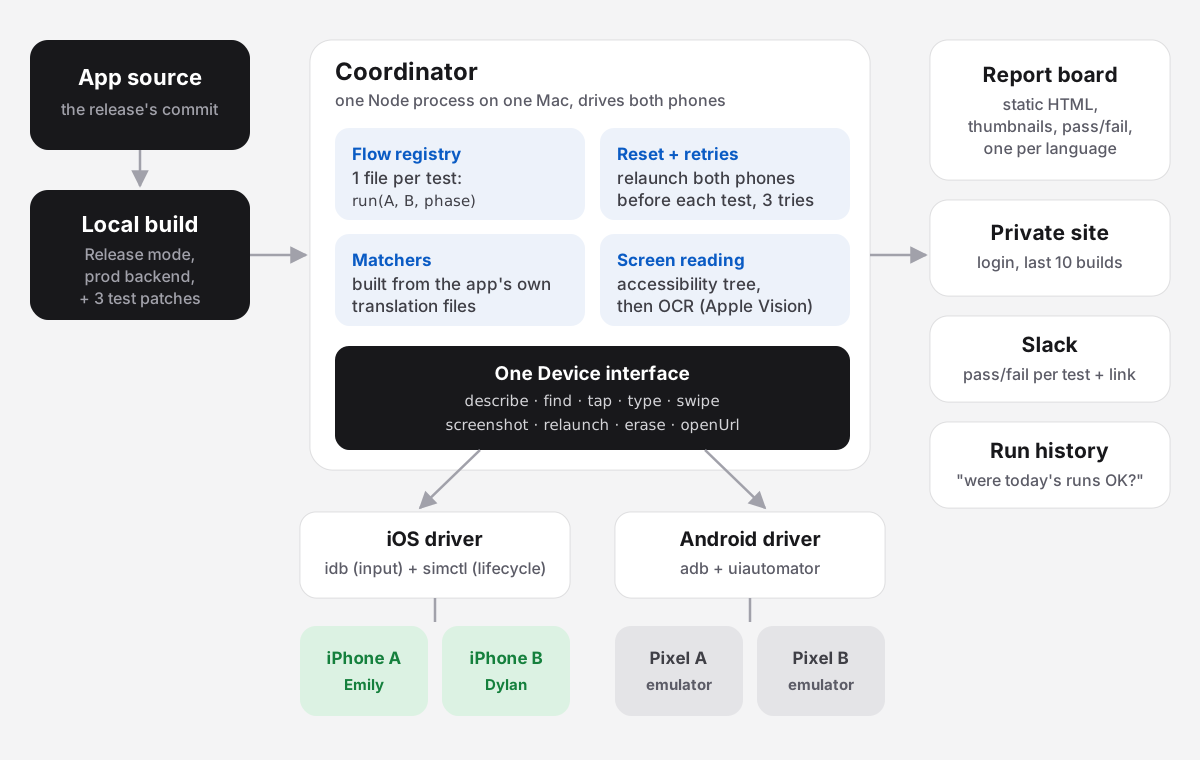
Five layers:
- The app. Built locally from the release’s source, in Release mode, against the production backend.
- The coordinator. One Node process on one Mac. It holds both phones, runs the tests in order, records results.
- One Device interface.
describe,find,tap,type,swipe,screenshot,relaunch,erase,openUrl. Every test talks to this, never to a tool directly. - Drivers. One for iOS (
idb+simctl), one for Android (adb+uiautomator). Same interface, different plumbing. - Outputs. A static HTML report, a private website, a Slack message, and a run history I can query.
About 2,600 lines of JavaScript in total, plus a small Swift tool for OCR.
What one test run does
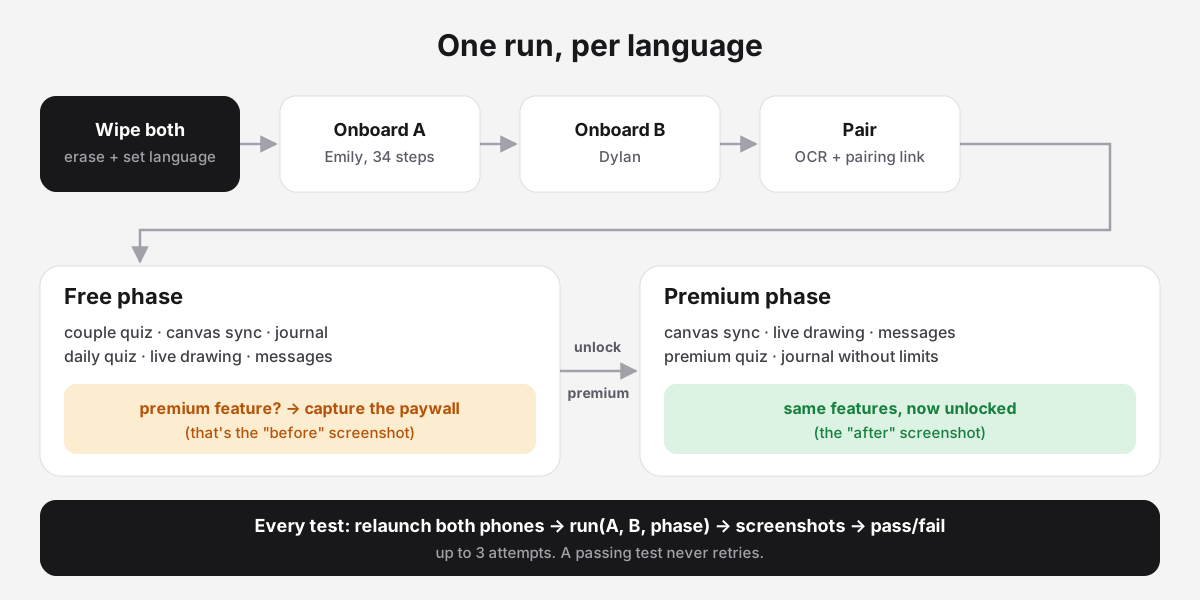
A test is one file with one function:
// flows/quiz-couple.js
function run(A, B, phase) {
  // A plays a quiz to the end, B sees it waiting, B plays, the result shows
  return { ok, device: 'A+B', steps: [...screenshots], note: 'what it did' };
}
And one line in a registry:
{ name: 'quiz-couple', label: 'Couple quiz', device: 'A+B', phase: 'free' },phase is free, premium, both or none. A both test runs twice: once as a free user (it captures the paywall), once as premium (it shows the feature working). That gives me the “before” and “after” side by side.
Before each feature test, the coordinator closes and reopens the app on both phones, so every test starts on the home screen. That was my rule: “Between test passes you can close /kill the app and reopen to end up on the right screen”. This resets navigation. Saved data stays, and some tests still depend on earlier ones.
The pattern inside most tests is A acts, B checks. In the couple quiz, A answers every question, then B plays the same quiz. The robot captures B’s “waiting for you” screen and checks for the result on B. The screenshots let me check every step in between.
A full run is 15–16 tests per language. The July 3 English run saved 259 screenshots. One language takes 30 to 90 minutes, both languages about two hours, once the app is built.
Design decisions, and the options we rejected
1. How to drive the phones: Maestro, agent-device, or idb
The problem. We needed a tool that can tap, type and read the screen on two phones, and pass data between them (like the pairing code).
What we looked at:
| Tool | For | Against |
|---|---|---|
| Maestro | Simple YAML tests, already in our CI | Coordinating our two devices would need extra code. Our only Maestro test was old and broken |
| agent-device | Made for AI agents, can hold state across both phones | Its taps often didn’t trigger our React Native buttons. It froze on screens with a looping video |
| idb + simctl | idb (from Facebook) reads the screen and taps. Apple’s simctl resets, launches and screenshots. Both are fast and boring |
Low level: we write our own coordinator |
My first call was agent-device. On day 1 it failed on the real app. I told Claude to keep agent-device but “use this idb to get out of situations agent-device cant”. By the end of the day, idb was doing everything.
The tradeoff. We own the coordinator and the driver. More code, but full control.
2. Simulators, not real phones
Simulators can be wiped, started and screenshotted from a script. Two of them fit on one Mac.
We looked at testing real purchases on simulators, but didn’t get a purchase test working in this setup. So I decided: “let’s keep this premium issue on the side right now and test the free user flow only”.
The tradeoff. The robot tests premium access, not the payment itself. Payments need a different kind of test.
3. Which app to test
The production iOS build only installs on real iPhones, not on simulators. So the robot takes the same source code commit as the release and builds it locally, in Release mode, with the production backend. I asked for it to be “as close to production as possible”.
Getting a local Release build to even start took three fixes:
- A native crash on the first screen. A React Native library was linked twice. Building React Native from source fixed it (slower build).
- A crash from over-the-air updates. A local build has no update channel, so the update system crashed the app. We turned updates off for test builds.
- A hard kill from iOS. The app asks for tracking permission, but the local build was missing the permission text. iOS kills apps that do that. We add the missing texts after each build.
The tradeoff. It’s the same code, not the same binary. On July 3 we even found the native shell was older than the JavaScript inside it. Close to production, not identical.
4. How the robot reads a screen
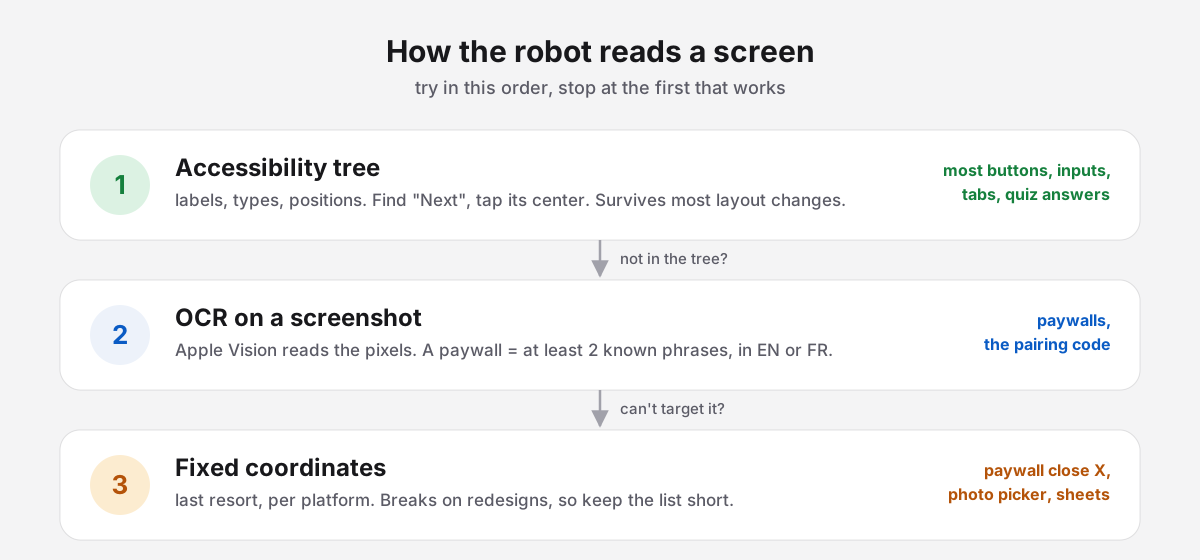
Most buttons are in the accessibility tree: a list of every element with its label and position. Find “Next”, tap its center. It depends much less on screen size than fixed coordinates.
But our paywalls are invisible to it. The tree shows the screen behind the paywall. Same for the pairing sheet. So the robot takes a screenshot and reads it with Apple’s text recognition (Vision). A screen counts as a paywall when at least 2 known phrases appear, in English or French:
const MARKERS = [/grow closer/i, /your partner does ?n'?t pay/i, /save\s*\d+\s*%/i, /rapprochez-vous/i, ...];
const paywall = MARKERS.filter((m) => m.test(ocrText)).length >= 2;
One marker could be a coincidence. Two is a paywall.
Fixed coordinates are the last resort: the paywall’s close button, the photo picker. They break on every redesign, so the list stays short.
One performance lesson: early onboarding steps took about 48 seconds each. Reading the screen took 2 seconds, but the code read it 20 times per step. Now each step reads the screen once and reuses it.
5. A new user every run
Deleting and reinstalling the app is not enough. The login stays in the phone’s keychain, and the backend still knows the user. The app opened straight on the home screen.
So every run wipes the whole simulator (simctl erase), then installs the app.
The tradeoff. About a minute per phone to boot fresh, and permissions, photos and the Apple account are gone too. The robot has to handle all of that again, every run.
6. Pairing two phones
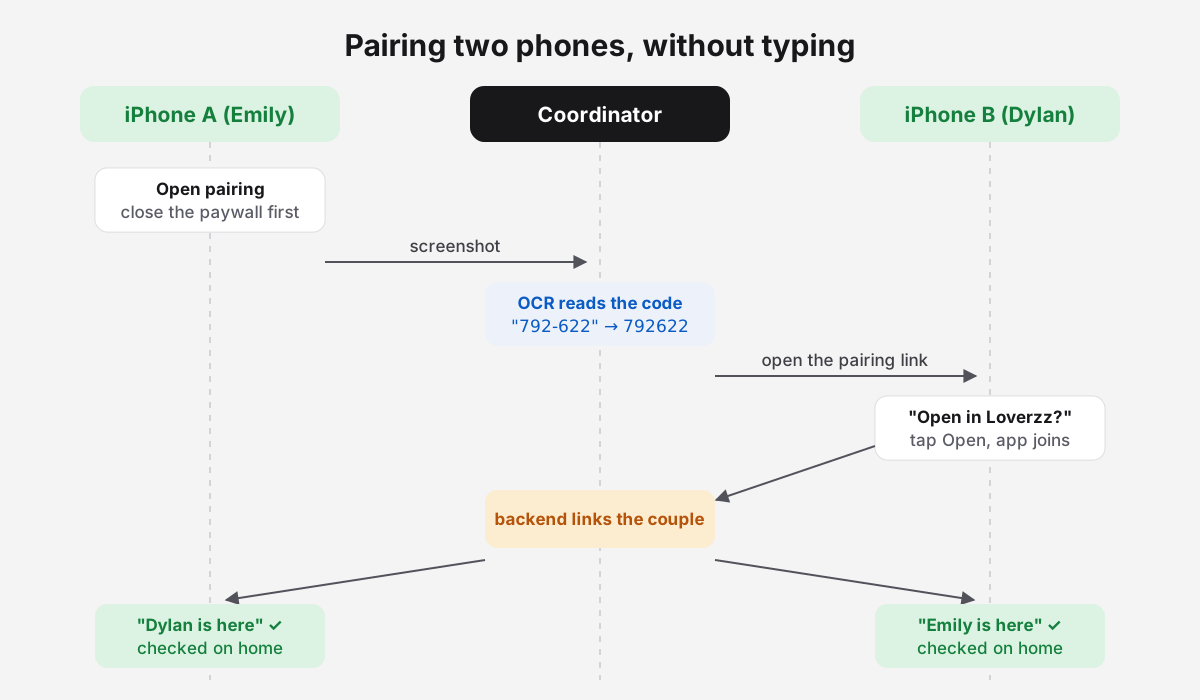
Version 1 copied A’s code to the clipboard and typed it on B. Then the app redesigned pairing: the code and the input field became invisible to the robot, and the field wouldn’t take focus.
Version 2: OCR reads the code on A’s screen. Then the robot opens the app’s own pairing link on B, with the code inside. The app joins the couple. Then both home screens must show the partner (“Dylan is here” / “Emily is here”).
The tradeoff. The real join and the backend sync are tested. Typing the code by hand is not.
On Android, the code is a real label in the accessibility tree, so no OCR. But the home screen says “was here just now” instead of “is here”. Small text differences like this are most of the work of a port.
7. Free first, then premium
I wanted the robot to catch money problems, not only crashes:
“its a good way for us to spot if a feature is now free that shouldnt or if a paywall doesnt work at all.”
So the run has two phases. The free phase runs the main features and captures the paywalls where they appear. Then the robot unlocks premium on both test phones. The premium phase repeats some features, now unlocked, and adds premium-only checks.
The first unlock method worked in English but not reliably in French, and four premium tests failed in a chain. We changed the method to one that works the same in every language.
8. Two languages
I suggested two options: switch the language inside the app, or “update the phone language before starting the series of test”. We picked the phone language. Onboarding then happens in French from the first screen, and even iOS popups are in French.
To be safe, every app launch also passes the language as a launch argument, so it can’t drift between tests.
The best trick is how the robot finds buttons in any language. The app’s translation files use the English text as the key:
{ "Next": "Suivant", "Save": "Enregistrer", "%1 is here": "%1 est là" }So the robot reads the app’s own translation files and builds its matchers from them:
d.mEq('Next')         // /^Suivant$/i in French, /^Next$/i in English
d.mFrag('%1 is here') // matches "est là" in French
When the app’s translations change, the robot follows by itself. No second dictionary to maintain.
Two exceptions. Quiz content comes from the backend, not from the translation files (“green light” is “Bonne nouvelle” in French), so it has its own matchers. And the French keyboard changed some typed text: “Date” became “Dqte”. So the French journal test checks that the item exists, not its exact title.
The tradeoff. Because the matchers come from the translations, the robot can’t tell if a translation is wrong. It only shows me every French screen, and I check them.
9. The report
I asked for one screenshot per step, on each device, small. Every file is named <number>_<A|B>_<step>, so the order is always clear, across both phones.
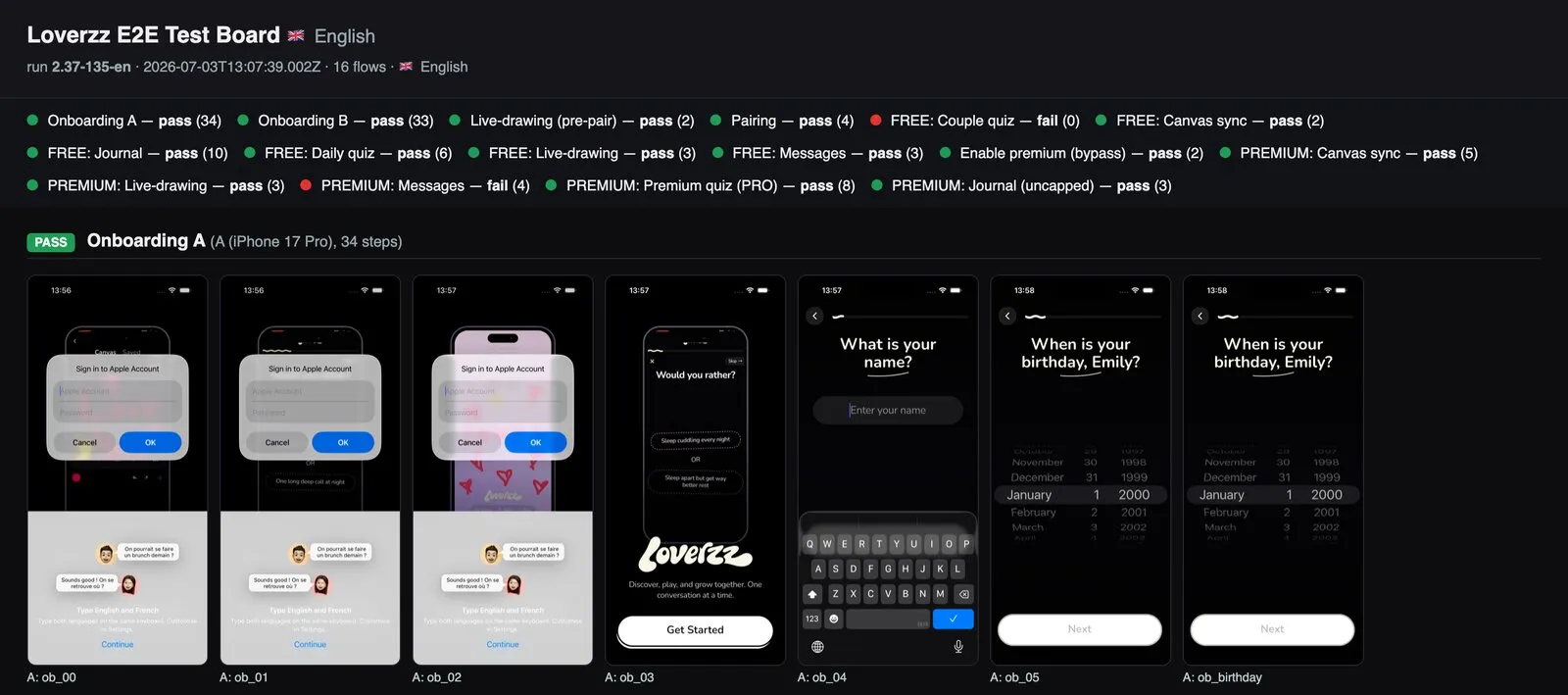
The report is one static HTML page per language: every test with a green or red badge, then its screenshots in order.
For hosting, I wanted the team to see it, but “IT shouldn’t be publicaly available from anyone”. So I asked for “a super simple password protected webserver we host on cloudflare”. It’s a small Cloudflare Worker with a login. The first upload was 71 MB for three reports. Keeping only thumbnails brought it down to 6.1 MB, and the site keeps the last 10 builds per version.
After each full run, Slack gets the score, the result per test, and the link. And a run history file answers my favorite question: “were the runs from yesterday/today successful?”
10. When to run
The plan: a small script on the Mac checks every 10 minutes for a new production build, takes its commit, builds it, runs everything, and publishes. With a lock so two runs never overlap.
We also looked at running it in the cloud, on Expo’s CI. As far as we could tell, their test runner handles one device at a time, not a couple. So it stayed on my Mac.
The honest part: we never switched the watcher on. In practice, I started each run with one message to Claude, like this one:
“a new build is live on aes -> test it ! v2.36, FR / EN”
For the releases I tested, that was enough.
11. The Android port
The Android version uses the real production Android bundle, converted to an installable APK with Google’s bundletool, on two emulators (a Pixel 9 and a Pixel 6a).
The Android driver extends the same Device class. Only the plumbing changes: adb for taps and typing, uiautomator for reading the screen. Matchers, reports and most of the test logic are shared.
What didn’t transfer:
- Reading the screen is slow.
uiautomatorwaits for the screen to be “idle”, and our onboarding has an animation that never stops. Reading took 15–22 seconds. We raised the timeout to 30 seconds. - Date pickers are a calendar, not a wheel. And the calendar’s “next month” arrow is also called “Next”. The robot kept changing months until we made it tap the bottom-most “Next”.
- The emulator has no photos. The profile photo step can’t be skipped, so the robot adds a photo to the gallery first.
- The premium unlock doesn’t work on Android yet. Onboarding, pairing and 6 feature tests passed, in separate runs. The premium phase is still open.
Reliability lessons from end-to-end mobile testing
Most of the work was not writing tests. It was making the robot see the app correctly.
- One controller per phone. We had a helper running in the background to close a popup that appeared every 1–2 seconds. One day, 14 copies of it were running at once, all fighting the tests for the same phone. Blank screens, lost taps. Now popups are closed inside each test, and nothing else touches the phone.
- “Home” must really be home. A new promo screen in onboarding showed the same widgets as the home screen. The robot thought onboarding was done 10 screens too early, and everything after failed. Now “home” needs home-only markers, and onboarding buttons on screen mean “not home”.
- The app has memory. The first messages test created a conversation. The next time, the “Write a message” button was gone, replaced by the conversation preview. Relaunching the app doesn’t reset that. Tests must expect both states.
- Know what green means. Tests get up to 3 attempts, and in the free phase, reaching the paywall counts as a pass. That’s right for a visual check. It’s not a strict release gate, and the runner doesn’t block a release when a test fails.
- Write every fix down. Every hard-won fix went into the project’s instructions file. The next session, human or agent, starts from there instead of learning it again.
What it didn’t do
- I can’t point to a production bug it caught. Most red rows were problems in the robot or in the local build. What it gave me is coverage: the main couple flows, on both phones, in both languages, for every release I tested.
- Every redesign broke something. The first version came quickly. Then we kept fixing it for four weeks, as the app changed.
- It never tested a real payment. Only premium access.
Working with Claude Code on this
I chose what to test, which tools to try, how to share the reports, and when to cut a test. I also set the test data: Emily and Dylan, January 1, 2020, and a profile photo each time. Claude Code explored the app with me, wrote the scripts, and debugged them on the live simulators.
Over four weeks that was about 3,000 agent tool calls, 27 sub-agents, and 43 commits, all co-written with Claude. The most useful habit: every gotcha we found went into the project’s instructions, so no session had to learn it twice.
How to build your own two-device test robot
- Explore by hand once, then script it. No AI model needed at run time.
- If your app is multiplayer, test with 2 devices from day 1. Pairing and sync bugs only exist between devices.
- One coordinator, one interface, one driver per platform. Tests never talk to tools directly.
- Wipe devices, don’t reinstall apps. Fresh users, every time.
- Accessibility first, OCR second, coordinates last. And keep the coordinate list short.
- Run free, then premium. Paywalls are where the money breaks.
- Build matchers from your app’s own translations. One source of truth for text.
- Screenshot every step, name files by order and device. The report is the product.
- Expect maintenance. Every redesign will break something. Budget for it.
A robot couple won’t replace testing on your own phone. But now I open one report instead of holding two phones and tapping through every screen, in two languages.